
Led UI/UX team on major feature design & FE development, sales funnel optimization, and new verticals.
Overall Challenge
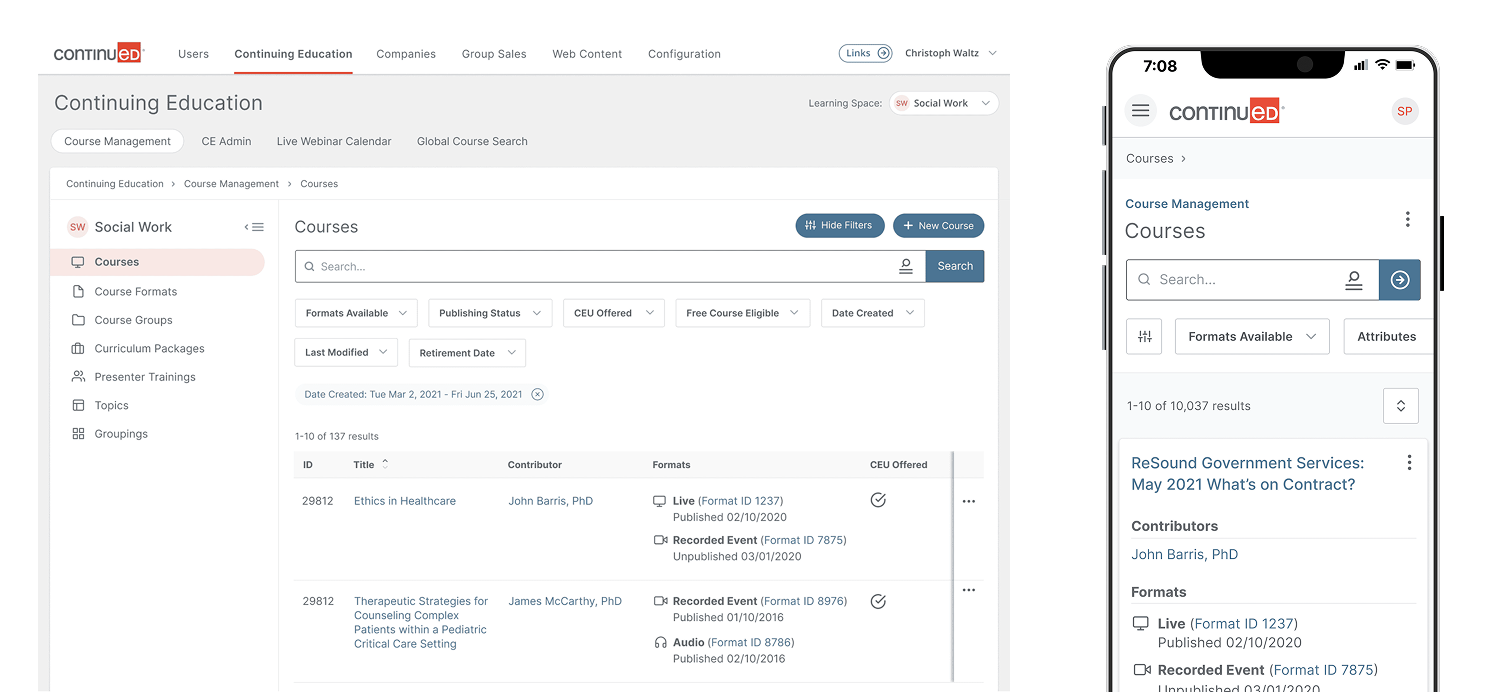
Starting out as the sole designer at Continued, I had a lot on my plate. I had a new system to learn, customer behavior to research, and I needed to help grow the team. Part of the role also involved designing sales funnels and optimization. Since no part of the product was truly designed, funnels were long and tedious. Every part of the product needed attention.
The product also did not feel like an application, it felt more like a standard website. The goal quickly became to revamp the entire logged in portion of the application, providing a more app-like experience, dubbed “Applification”.
Further down the line, we realized we needed to launch new verticals fast. An entirely new admin system would need to be designed to rapidly create and manage new verticals in a global, sustainable way.
The Approach
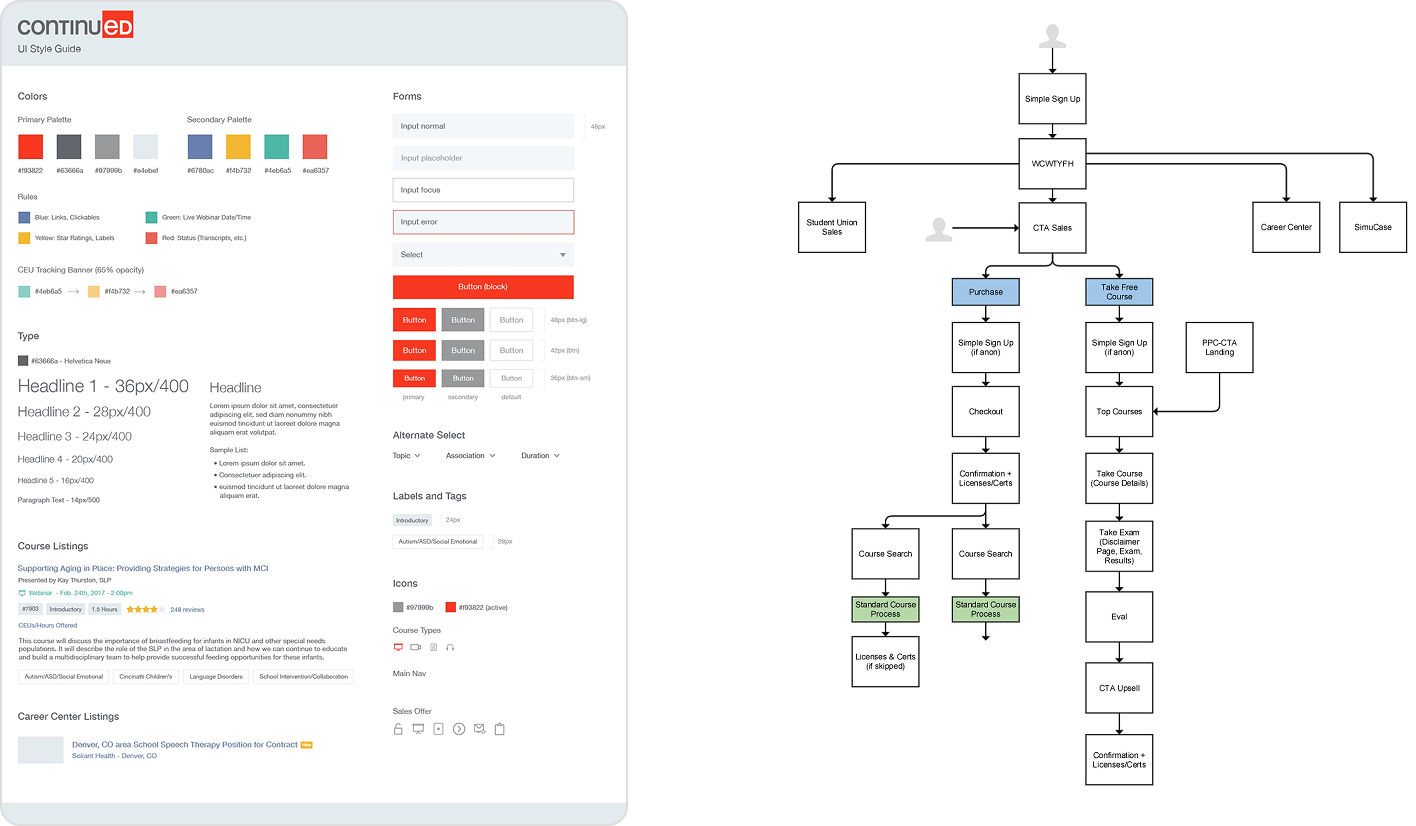
Working closely with the brand design team, the UI/UX team set about redesigning the application experience with special attention paid to mobile responsiveness. Our users were split 50/50 between web and mobile (and many use both), so both experiences needed to match up.
New user flows were created to cut down on time to completion. A new UI style guide was created, along with a complete design system that enabled the team to rapidly prototype new flows.
My team and I worked closely with our internal industry experts to design the new admin system for launching and managing new verticals. We went from taking close to a year to launch a new vertical to just a few months.
Athena Design System
A fresh new design system to rapidly prototype for the Project Athena admin system.
Role: Lead Designer
Research & UX
A heavy focus on accessibility was placed on this project in order to meet WCAG 2.2 (AA) guidelines for font sizes, color contrast, spacing, and layout. To make sure we were meeting our requirements, we regularly utilized a number of helpful Figma community plugins to check our work.
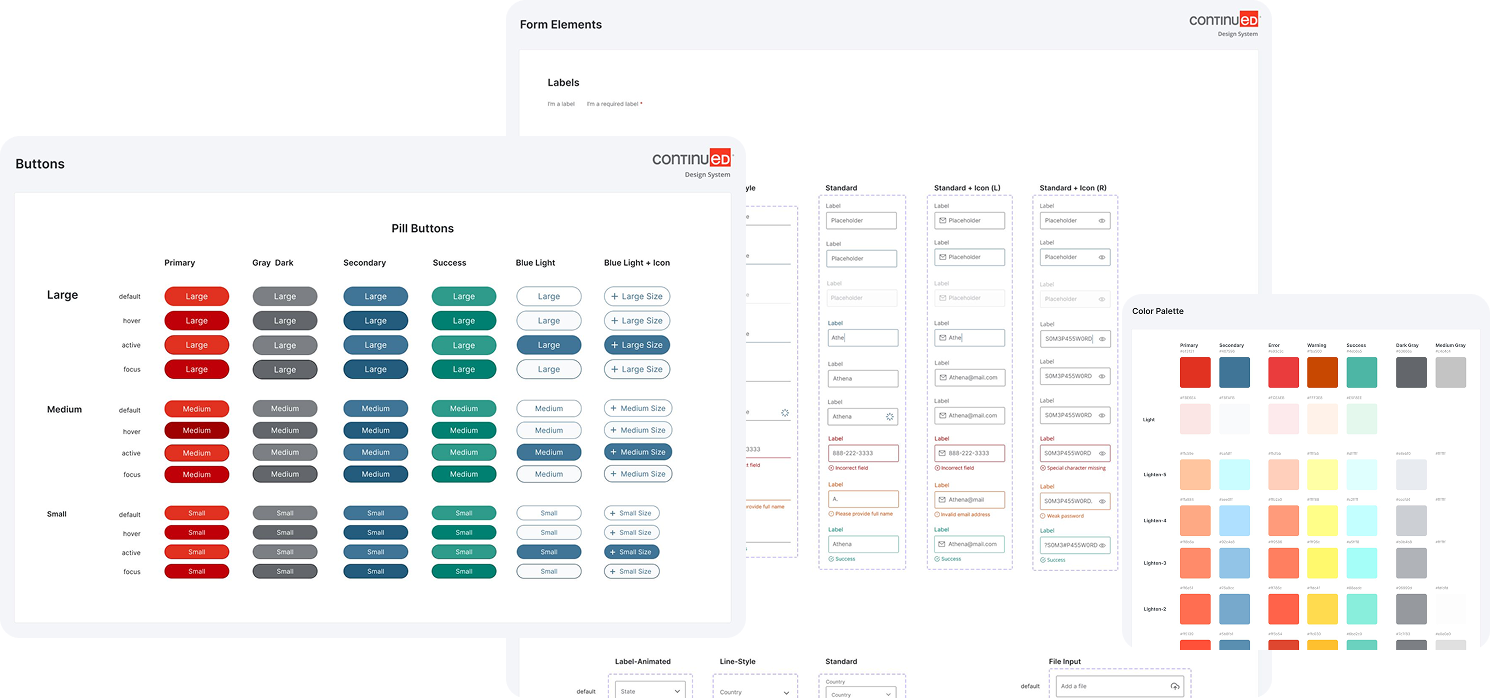
Utilizing the Figma Variants feature, all components are built out to easily change states (e.g. hover / focus / active); display active nav items; change button types, sizes, and colors; pull in icons; etc.
Design
The Continued Design System contains every UI element needed to quickly build high-fidelity prototypes in Figma. For structure, we chose Atomic Design, breaking out components by atom, molecule, and organism which are utilized to build templates and high-fidelity mockups with consistent layout and design standards.
Taking advantage of the latest features in Figma allowed us to create a design system that fits every need our product currently has. When it comes time to evolve, the system also enables a new level of ease for updating components, UI templates, and page designs.
Some of our requirements:
- Utilize Brad Frost's Atomic Design Principles to structure the component library
- Heavy use of Variants feature whenever possible to simplify the component library
- Create templates for reusable layouts leading to simplified frontend code
Pain Points
- We had trouble choosing between a ready-made design system and a completely custom system. In the end, we chose a ready-made system and cherry-picked components. Anything that was 100% viable, we pulled in. Slight modifications were needed for various components.
- As this was the first design system the team had worked on, there were some learning curves to overcome.. The team, including myself, needed to learn how to properly use Figma's design system features like variants, auto-sizing, and complex components.
- Building and maintaining a complete design system while working on other projects, all with a small team, was also challenging. This led to us taking an agile approach, building pieces of the design system over time.
View It Live
See select work in Figma →Design Leadership
My time at Continued allowed me to grow into my role as a designer and a design leader. It is where I learned about cross-team communication, team growth, and what it takes to give design a seat at the table.
A prime example of this is the Athena Admin system, which required collaboration on the part of nearly every department at Continued and touched every part of the platform.
Athena Admin
New admin system for internal management of verticals and easy launching of new verticals.
Role: Lead Designer
Why Implement It?
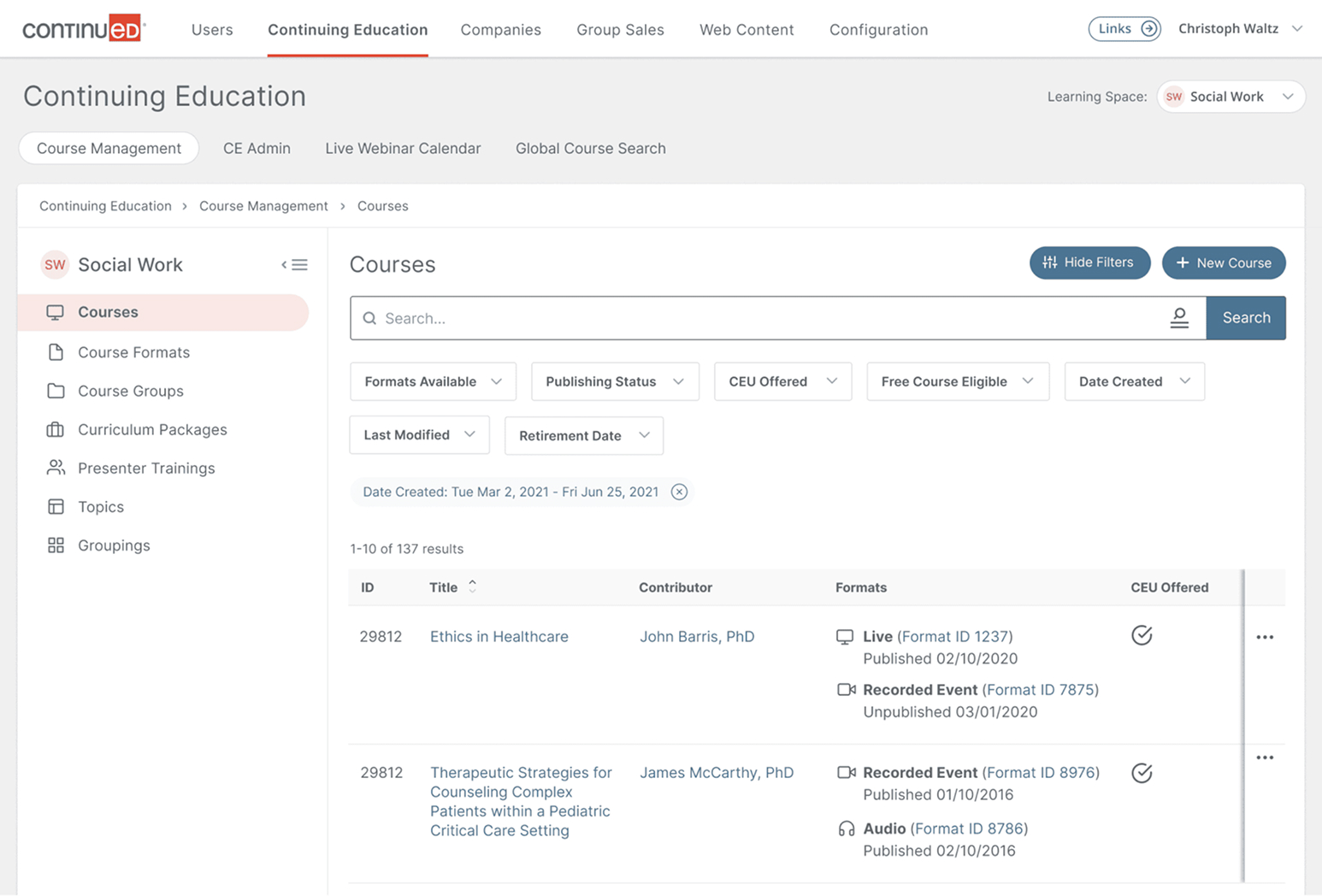
The Athena Admin System was created as a greenfield project to enhance the usability of the Continued course management system, learning space management systems, marketing pages, and group sales funnels.
My Role
Lead designer on project. Worked with my senior designer and collaborated with product leads and engineering team to create new user processes for internal admins, improve existing processes, and design a greenfield project from the ground up.
Research & UX
- Several stakeholder meetings went into the research phase of this project, interviews with internal admins that use the system the most (course administrators, group sales, people launching new verticals)
- Collaborated with engineering on frontend and CMS frameworks (Vue.js was chosen, CMS TBD)
- Collaborated with product on all user requirements and frontend needs such as form validation
Design
Overall Project Athena Goal for the Design Team: Rebuild entire product ecosystem from the ground up, allowing business to launch into new markets faster and more easily.
POC Goal: Provide proof of concept for an admin system that runs on a headless tech stack (Vue.js for frontend).
UI/UX Department POC Initiatives:
- Determine overall design direction, frameworks, and tools
- Design initial page templates and navigation for the admin system
This project was connected to and relied heavily on the Athena Design System project.
Pain Points / Challenges
Since this was a greenfield / proof of concept project, we had to be very strategic about the features we worked on first. We aimed for high-impact, most used parts of the admin system.
New, unique user processes: Concepts like Hard vs Soft required fields for launching new verticals used in a complex, multi-step forms that could be saved in the middle of progress presented design challenges that we overcame using user stories.
Design Challenge
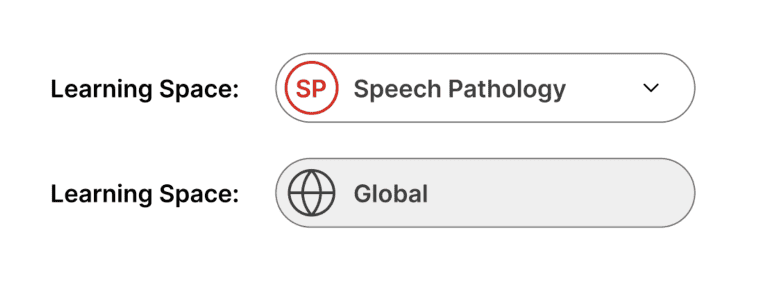
Because Athena takes a modular approach, the User Module becomes a global database with associated learning spaces (users can be associated with multiple), rather than a learning space with associated users as it is in the legacy system.
The solution: Add a Learning Space select input to the primary navigation allowing the admin to switch learning spaces while staying on the same view. The input switches to "Global" when viewing data that is shared with all learning spaces.
View It Live
View select work in Figma →Overall Impact
The team and I modernized the application, providing an app-like experience that delighted users. We also created a future-proof design system, allowing the team to rapidly prototype new features.
The new admin system design allowed internal stakeholders to manage all vertical data in one place and launch new verticals efficiently.
During my time at Continued, we also improved sales funnels, leading to a substantial increase in conversions of 8-20% across all verticals.